All Revelator clients using the Revelator Spotify deal are eligible for Spotify Discovery Mode (SDM) submission.
What is Spotify Discovery Mode?
With SDM, artists and labels can prioritize specific songs, and Spotify will use this signal to influence algorithms that determine personalized listening sessions, such as Radio, Autoplay, and Spotify Mixes (known as Discovery Mode contexts). This signal increases the likelihood of selected songs being promoted, but does not guarantee it.
Why is Discovery Mode effective?
SDM is based on listeners' tastes, prioritizing music from their listening patterns rather than relying on sponsored promotion. This enhances authentic discovery aligned with genuine preferences. However, it only works if fans love the music, as Spotify tracks listener engagement and incorporates it into future recommendations.
Which tracks are eligible for Spotify Discovery Mode?
- Tracks delivered to Spotify via the Revelator deal
- Tracks released on Spotify for at least 30 days
- Tracks streamed in Discovery Mode contexts at least 20 times over the last 28 days
- Tracks that met Spotify's monetization eligibility criteria in the previous month
| Note Content automatically excluded from SDM: spoken word, audiobooks, podcasts, videos, karaoke. |
What are Spotify's commissions for Discovery Mode?
The service doesn't require an upfront budget. When you opt in an eligible track to the campaign, Spotify applies a 30% commission to the recording royalties generated from streams in Discovery Mode contexts. This fee is deducted from your future royalty statements and delivered in a report separate from the standard royalty reports.
Any other streams of tracks enrolled in Discovery Mode that occur outside of Discovery Mode contexts remain commission-free.
Revelator does not charge anything extra for Discovery Mode beyond your usual revenue share.
Why do Discovery Mode royalties appear as a negative amount on statements?
Discovery Mode royalties appear as a negative amount because tracks in the program earn a lower per-stream rate for plays from Autoplay, Radio, and other recommendations. This adjustment reflects the difference between standard and promotional rates, but it's important to note that royalties themselves are not negative — this is just how Spotify displays the adjustment.
What kind of results can labels and artists expect?
Spotify reports that Discovery Mode drives meaningful increases in saves, user playlist adds, follows, and first-time discoveries from listeners outside an artist's home country.
Results vary considerably from track to track. Discovery Mode tends to work best for catalog tracks that are no longer in their initial release window and have room to grow, rather than for brand new releases or tracks that already have very large audiences.
Neither Revelator nor Spotify guarantees the performance of any track enrolled in Discovery Mode.
| Note Revelator Pro users are seeing a significant boost in their Spotify catalog revenue, with Discovery Mode increasing streams and audience engagement. This is measured at the catalog level; individual tracks vary considerably. |
How do I get started and submit tracks to Discovery Mode?
If you're a Revelator Pro client using the Spotify–Revelator deal, you receive a personalized Discovery Mode dashboard. This is a live Google Sheet that updates every month. You use it to opt tracks in for the coming campaign, and to review how your tracks performed in the campaign that just ended.
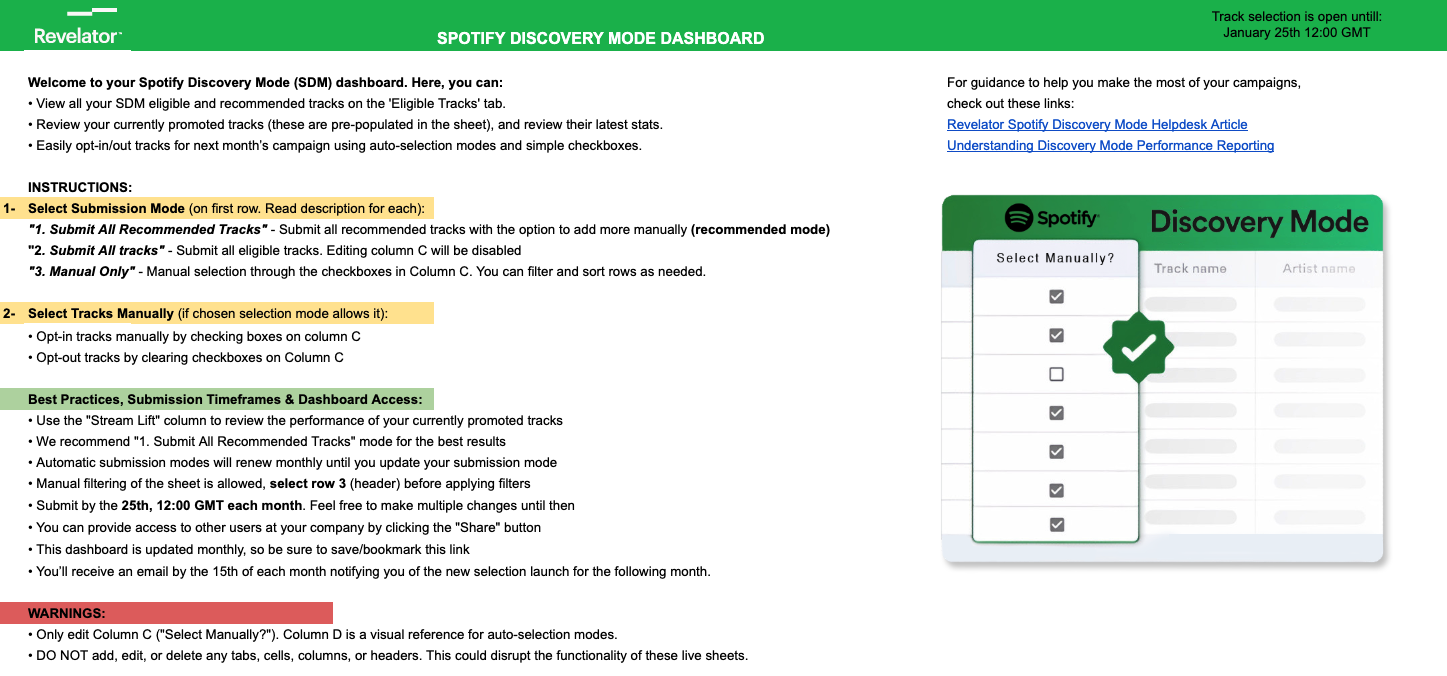
Your Discovery Mode dashboard
Your dashboard has three tabs.
Instructions
How the dashboard works, the submission modes, key dates, and best practices.
Next Campaign Selection
Every track in your catalog that is eligible for the upcoming campaign, with Spotify's recommendations highlighted. This is where you make your selections. It also shows early performance figures from the first ten days of the campaign currently running.
You can select tracks individually, or use one of three submission modes:
- Submit All Recommended Tracks (recommended) — submits every track Spotify recommends, and you can still add others manually.
- Submit All Tracks — submits everything eligible. Manual selection is disabled.
- Manual Only — you choose every track yourself using the checkboxes.
Previous Campaign Results
Track-level results for the campaign that just finished, covering the full month rather than a partial view. This tab is new. It refreshes at the beginning of each month.
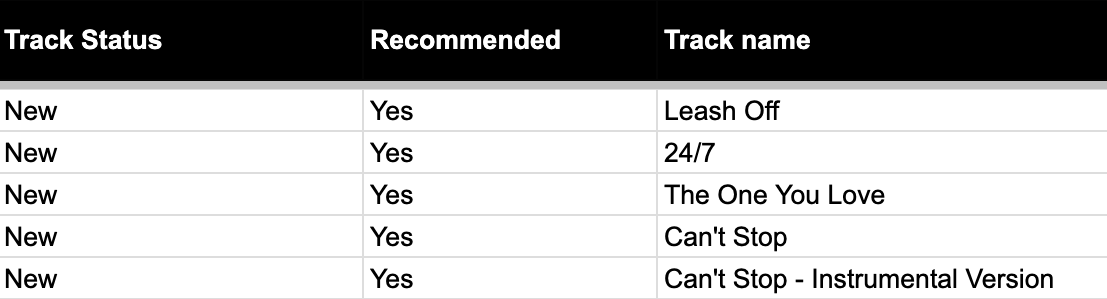
What the Track Status column tells you
| Track Status | What it means |
|---|---|
| In Active Campaign | The track is in the campaign currently running, so it has performance figures. |
| Newly eligible | The track has just become eligible for the first time. No performance figures yet, since it hasn't been promoted. |
| Blank | The track is eligible but isn't currently enrolled in a campaign. It has appeared on your list before. There are no figures to show, since the track isn't being promoted right now. |
Only tracks in an active campaign have lift figures. For everything else the performance columns are empty, and that's expected rather than a gap in the data.
Understanding your performance metrics
In July 2026, Spotify introduced a new way of measuring Discovery Mode performance. You will now see two different lift figures, each answering a different question.
Campaign stream lift — the main metric
Spotify estimates how many streams your track would have received in Discovery Mode contexts if it had not been in the campaign, then compares that estimate to what the track actually received. The estimate comes from a machine learning model that considers the song's own history, artist metadata and genre, and previous appearances in personalized listening contexts.
In plain terms, this tells you how much Discovery Mode itself contributed during the campaign. A track showing a 200% campaign stream lift received roughly three times the Discovery Mode streams it would have had without the program.
This is the most useful figure for understanding whether Discovery Mode is working for a particular track.
Historical stream lift
This is the metric that was previously called simply "Stream lift". It compares your track's current Discovery Mode performance against the 28 days before the track was first enrolled in Discovery Mode.
Because that reference point stays fixed, this number is usually much larger and tends to grow over time. It is useful as long-term context, showing how far a track has come since it joined the program, but it does not tell you how the current campaign is performing.
Why do some tracks show "Not enough data"
Spotify only calculates campaign stream lift for tracks that had at least 500 Discovery Mode context streams in the previous month. Below that volume, there isn't enough information for a reliable estimate, and the field will show "Not enough data".
This is not a sign of poor performance. It simply means the track hasn't yet reached the volume Spotify needs to measure it. As a track builds up streams in Discovery Mode contexts, the figure will start to appear. Roughly half of all enrolled tracks fall into this group in any given month.
Color coding
Campaign stream lift of 50% or above is highlighted in blue on your Next Campaign Selection tab. Spotify indicates that lift at this level is likely to generate enough streaming royalties to cover the commission and earn additional revenue.
Tracks below that level are not highlighted, and there's no need to act on them. Underperforming tracks are handled automatically, as described below.
What does the "Recommended" column signify in the SDM dashboard?
This column shows whether Spotify predicts a track will see a lift in streams in Discovery Mode contexts if you include it in your upcoming campaign. Since July 2026, the recommendation model has used campaign lift data to make that prediction, alongside signals such as the song's performance in Radio and Autoplay over the last 28 days, artist metrics like followers, monthly listeners, and playlist adds, and previous inclusion in Spotify personalized playlists.
In Spotify's own words, a track that is not recommended is not expected to perform poorly. It simply has less signal, suggesting it will outperform in Discovery Mode contexts. You are welcome to include any eligible track in your campaign.
Spotify stands by its recommendations but cannot guarantee specific outcomes. Use these insights alongside your own strategy and goals when deciding which tracks to include.
How many eligible tracks can I submit for Discovery Mode?
Revelator Pro clients using the Spotify–Revelator deal can submit an unlimited number of eligible tracks for Discovery Mode.
What are the Spotify Discovery Mode timeframes?
Discovery Mode campaigns run on a monthly cycle. Each campaign runs for a full calendar month, from the 1st to the last day of the month. Key dates:
- At the start of each month, your "Previous Campaign Results" tab is updated with full results from the campaign that just ended.
- 15th of each month (by EOD GMT): your "Next Campaign Selection" tab is refreshed with new eligible tracks and updated performance figures. You'll receive an email notification and have around ten days to make your selections. The dashboard may receive further updates within 24 to 48 hours of the first refresh; selections made during that window are not affected.
- 25th of each month (by 12:00 GMT): selection deadline. You can make changes at any point up to the deadline.
Will I receive a notification once I complete my track selection?
No. Unlike the previous process, where you had to wait for confirmation of eligibility, the current system provides all eligible tracks in advance through the dashboard, making notifications unnecessary. All your selected tracks will be included. Please note, however, that Spotify might still exclude tracks if their performance drops significantly between the selection date and the campaign start — these cases are rare.
How can I monitor the performance of my tracks in Discovery Mode?
You have two views, covering different periods.
Previous Campaign Results gives you complete track-level results for the campaign that just ended, refreshed at the start of each month.
Next Campaign Selection shows early figures from the first ten days of the campaign currently running, so you can see how things are starting before you make your next selections.
Together, these give you a finished picture of last month and an early read on this month.
What happens if a track isn't performing well?
The point of Discovery Mode is to grow your exposure and your revenue by reaching the right listeners in a relatively organic way. Revelator has put considerable effort into testing and refining how we run the program so that it stays profitable across your catalog, and we keep improving it as we learn more from the data.
We encourage you to review your results each month, which is why your dashboard gives you both the completed campaign figures and an early read on the current one.
Alongside that, we run a systematic review of every enrolled track after each campaign. Tracks that consistently aren't generating enough additional streams to justify the Discovery Mode commission are automatically opted out of upcoming campaigns, so you're not paying the higher commission on tracks that aren't earning it back. This is not permanent. After a short cooldown, tracks automatically return to your eligible list and are evaluated again. Performance changes over time, and a track that didn't work in one period may do well in another.
You can also opt any track out yourself at any time, using the checkboxes in your Next Campaign Selection tab.
Can I submit tracks for Discovery Mode via Spotify for Artists?
No. While a Discovery Mode section might be visible on your (or your artist's) Spotify for Artists dashboard, tracks distributed by Revelator cannot be submitted or monitored through that platform. If you or your artist continue to see an SDM section in Spotify for Artists, it's likely due to past partnerships with distributors who used this method, or because existing tracks are still distributed by them.
The Revelator SDM program works differently and uses a dedicated dashboard as outlined in this article. The main benefit is that it avoids artist eligibility restrictions found on Spotify for Artists — such as needing a minimum of 25,000 listeners and three eligible songs — meaning Discovery Mode is available for almost any eligible track in your catalog.
| Need help? As always, we're here to help you succeed. For any questions or comments, reach out to us at support@revelator.com. |
Related articles
Was this article helpful?
That’s Great!
Thank you for your feedback
Sorry! We couldn't be helpful
Thank you for your feedback
Feedback sent
We appreciate your effort and will try to fix the article